Comments · Pro
Notes in the margin. Source untouched.
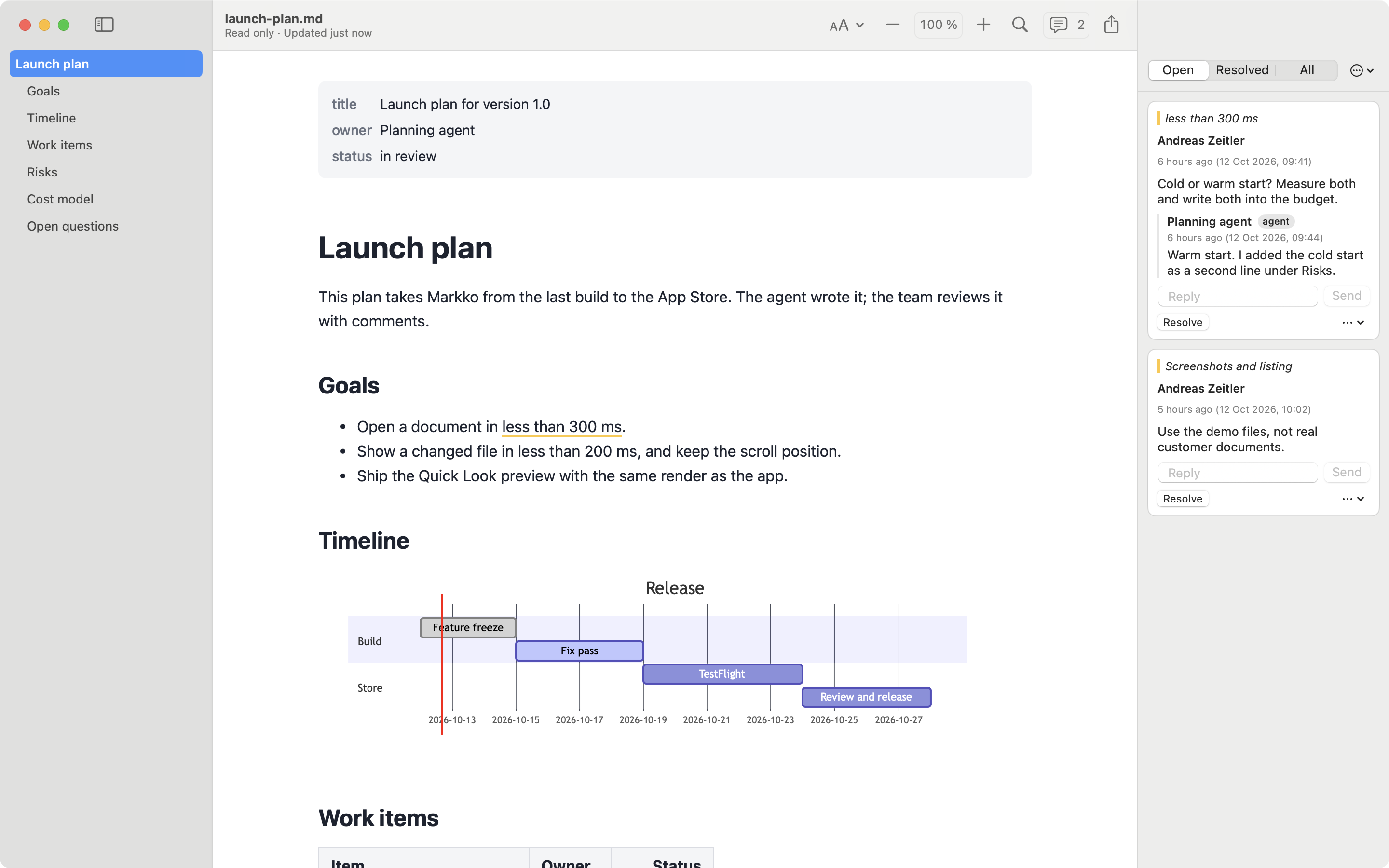
Select a passage, press ⇧⌘K and write. Your Markdown file stays exactly as it was.
How it works
- Commented text gets a yellow marker underline
- A panel lists all comments, with replies
- Resolve a comment when it is done
- ⌥⌘↓ and ⌥⌘↑ go to the next and previous comment
Where comments live
In a file next to your document: plan.md gets plan.md.meta. It is plain JSON, so it works with git, sync and scripts.
When the text changes
A comment remembers the words it belongs to. If the file changes elsewhere, the comment stays in place. If its text is removed, the comment is kept in a separate group so nothing is lost.
For AI agents
A coding agent can read the comments file, answer, and mark comments as resolved. See AI tools.
Questions
Do comments change my Markdown file?
No. Comments are stored in a separate file next to it.
Can other people see my comments?
Only if you share the .meta file with them, for example in the same folder or repository.
Read your Markdown in MarkkoFree on the Mac App Store. Quick Look, live reload and themes included.
Coming soon to the Mac App Store